The Simple Macro Recorder for Mac
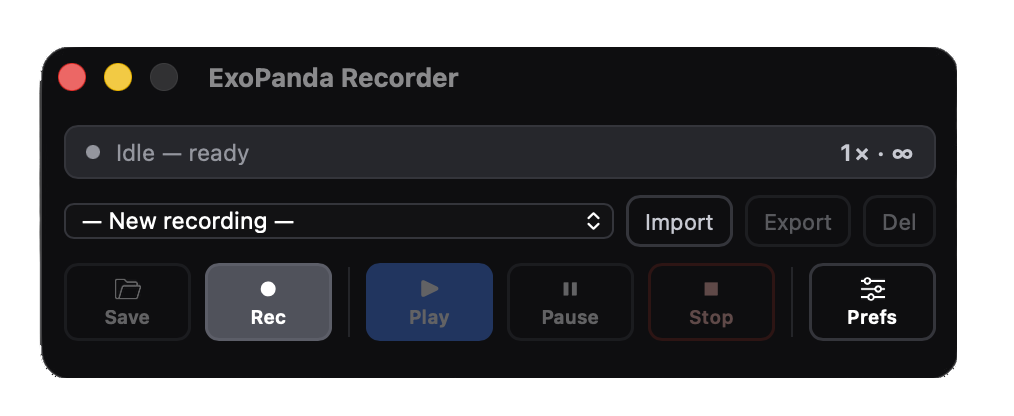
ExoPanda Recorder is an independent macOS macro recorder built for Mac users who need TinyTask-like simplicity. Record mouse clicks, keyboard actions, and replay them instantly. No account required.
? Looking for TinyTask for Mac?
TinyTask is a popular Windows macro recorder. There is no official TinyTask Mac version. ExoPanda Recorder is an independent macOS macro recorder built for Mac users who want similar simplicity—record clicks, replay actions, automate repetitive tasks.
You are downloading ExoPanda Recorder, not TinyTask. ExoPanda Recorder is not affiliated with TinyTask in any way.
Record. Save. Replay.
Three simple steps to automate any repetitive task on your Mac.
Record Your Actions
Click the record button. ExoPanda Recorder captures every mouse click, scroll, and keyboard press. Move freely—your entire workflow is being tracked.
- Captures mouse movements with precision
- Records all keyboard inputs
- Tracks scrolling actions
- Zero configuration needed
Save Your Macro
Stop recording and save your macro with a custom name. Your recording is stored locally as a .exomacro file you can reuse anytime.
- Save with custom names
- Organize multiple macros
- Portable file format
- Share macros between Macs
Replay Anytime
Load your saved macro and hit play. ExoPanda Recorder replays your exact actions. Set it to loop, adjust speed, or run once.
- Instant playback
- Adjustable playback speed
- Loop option for repetition
- Pause and resume anytime
ExoPanda Recorder vs TinyTask
Understanding the difference for Mac users.
ExoPanda Recorder
Independent macOS macro recorder
- Native macOS app
- Works on macOS 11+
- Records mouse & keyboard
- Save and replay macros
- Adjustable playback speed
- Loop playback option
- No account required
TinyTask
Popular Windows macro recorder
- Windows only (no Mac version)
- Records mouse & keyboard
- Simple interface
- Lightweight
- Not available on Mac
- Not available on Mac
- Not available on Mac
TinyTask is a separate application by different developers. ExoPanda Recorder is an independent project built specifically for macOS users who need similar functionality. This comparison is for informational purposes only.
Start Recording on Your Mac
Download the simple macro recorder for macOS. No account required. Free to try.